Checkin Management
Property Setting Cases

Project
Checkin+ Property Management System
Duration
May 2026 — June 2026 (4 weeks)
Role
UX Designer
UI Designer
Tools
Figma
Figjam
Team
Ruechaporn Jansuwan
Tanaporn Lawsuriyont
Overview
A property management system that enables properties to manage their settings and booking operations. Mainly focused on supporting senior UI designer, defining comprehensive UI cases, including edge cases and errors, to support seamless handoff to developers and QAs.
About Checkin+ Checkin Management
Checkin Management (CIM) is Checkin Plus Travel’s Hotel/Property Management System (PMS) refers to software designed to help property owners and receptions coordinate essential tasks like reservations, room availability, payments, and reports from a single platform. CIM is one of the products from Checkin Plus Travel is a tech startup that leverages technology to help Thai property owners manage their operations and reservations.


Checkin Management (CIM) enhances the small-to-medium property/hotel owners management experience through tagline
Book Direct
Manage Easily
Host Effortlessly
Project Goal
According to the improved Checkin Management (CIM) Property Setting flow, this project aims to define clear cases and variables for each setting to create a consistent and well-structured system. The goal is to make the design easier to understand, reduce ambiguity, and support a smooth hand-off process for both Development and QA teams.
Persona


User research identified two main user groups: Property Owners and Front Desk Staff. The research showed a strong need for simpler workflows, clearer information, and a more flexible system that can support daily operations across different types of hospitality businesses.
User Persona 1: Property Owner
User Persona 2: Reception

Design Principle
The overall UI, cases and variables have to follow the design under these principles.

Property Setting User Interface (Main flow )
A setup flow that allows property owners or managers to configure essential hotel information, room types, pricing, policies, and operational settings in one place. This ensures the PMS is properly set up and ready to support daily hotel operations.
Property Setting User Interface (Cases/Sub-flow)

1. Basic Information -First time register
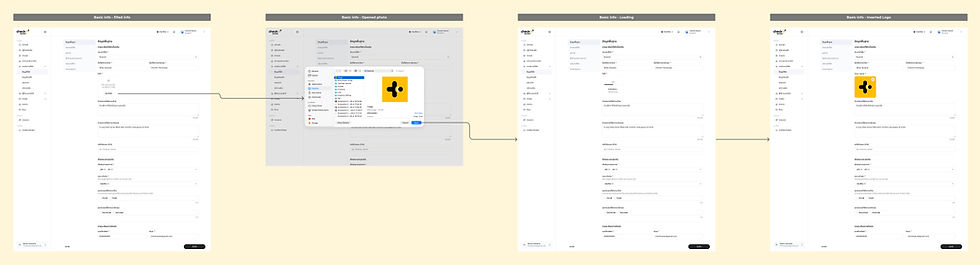
1. Basic Information -First time register (Insert Image Sub-flow)

2. Add Property Location - First time register

3. Add Property Image - First time register

4. Add Property Amenities - First time register

5. Add Property Policy - First time register

6. Add Special Dates and Seasons - First time register
6. Add Special Dates and Seasons (Sub-flow: Special holiday)


6. Add Special Dates and Seasons (Sub-flow: Select Season Date range)
Reflection
Working on the Property Setting flow helped me understand the importance of designing beyond the user interface. I learned to think more systematically about different cases, variables, and edge cases, while considering how the design would be built and tested. This experience also improved my collaboration with Development and QA teams and helped me create more structured and scalable design solutions.
1. Better understanding of system logic
Learned how different cases, variables, and conditions affect the overall product flow.
2. Improved edge-case thinking
Became more aware of exceptions and less common scenarios that need to be considered during the design process.
3. Stronger collaboration with Developers
Learned to communicate design decisions and system behaviors more clearly to reduce misunderstandings during implementation.
4. Better understanding of QA needs
Learned how to structure designs and define expected behaviors so QA can create test cases more easily.
